
You can now add multiple administrator users in CleanManager
In this update, we have expanded the administrator role in CleanManager. The Administrator user type has been divided into Master Administrator and Administrator, making it possible to assign administrator access to multiple users.
Administrators have access to almost all features and can work with planning, customers, employees, tasks, payroll, and invoicing, just as they have been able to until now.
Administrators have almost the same permissions as before, with only a few limitations.
They do not have access to Subscription (billing information and management of add-on modules) or Company data (company information, resources, employee handbook, etc.), and cannot create, edit, or delete other administrators or reset their passwords.
These actions remain available only to the Master Administrator. The Master Administrator is the user created when the subscription was set up and continues to have full access to all system features.
There can only be one Master Administrator.
NOTE:
It is not possible to create, edit, or delete employees with the same user type as the currently logged-in user. It is also not possible to reset passwords for users with the same user type.
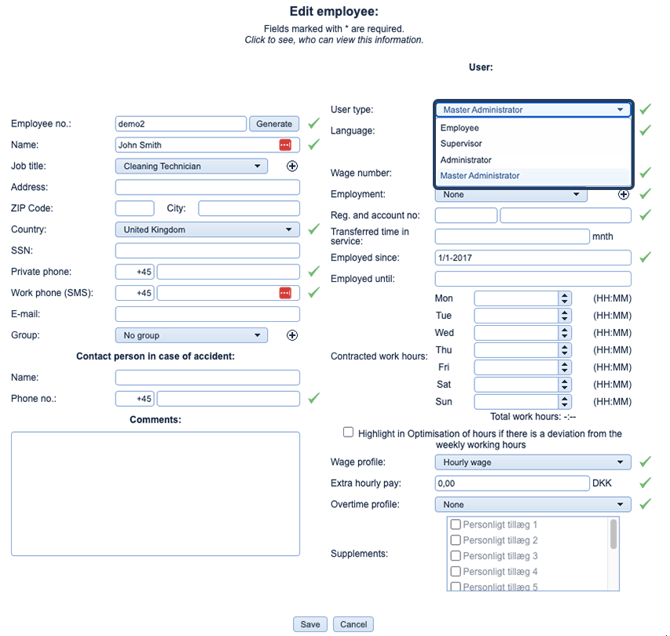
See a summary of the differences between the user types in the table below:
| Function | Master Administrator | Administrator |
| Number of users | One | Multiple |
| Access to settings | ✓ | ✓ |
| Scheduling, customers, employees, and tasks | ✓ | ✓ |
| Wages and invoicing | ✓ | ✓ |
| Access to Subscription | ✓ | ✗ |
| Access to Company data | ✓ | ✗ |
| Create/edit/delete administrators | ✓ | ✗ |
| Reset passwords (administrators) | ✓ | ✗ |