
New addition in General settings with the option to define a default for new tasks
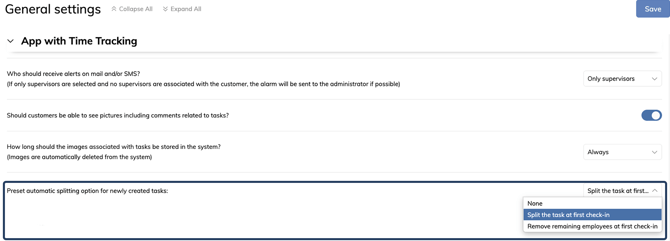
A new option has been added under App with Time Tracking in General settings, making it possible to define the default setting for “Automatic splitting” when creating new tasks.
This defines which option is selected automatically for “Automatic splitting”, while still allowing individual adjustments for each task if needed. New tasks will therefore follow the selected default, supporting a more consistent workflow and reducing the need for manual adjustments during task creation.
NOTE:
In order to see this setting, the App with time tracking add-on module must be activated.
Read more about how to activate add-on modules here: Add-on modules
The new setting under App with Time Tracking in General settings
Automatic splitting for tasks in the calendar and in the base calendar
-2.png?width=670&height=587&name=Releasenote%202-3-2026%20(2)-2.png)