
How do I round to whole weeks in the billing basis?
Service agreements can be used to bill Fixed prices per week:

If you use the fixed price setup, the billing basis will calculate how many weeks are in the defined period for which you are billing.
Example:
If you chose that the fixed price should be per week, that will mean that when a customer is monthly billed (Period: 01/06 - 30/06/22) the system will calculate how many weeks are included in this period.
Because not all months are necessarily consisting of four weeks, the billing basis will as a standard calculate precisely how many weeks there are in the time period.
In this example, the month has 4.29 weeks:

If you do not wish to write 4.29 weeks for the chosen month (which is also used to calculate the price) the system can be set up to calculate the period in whole weeks.
Through that, months will be split up into 4 or 5 weeks.
The Thursday in the fifth week is key to deciding whether the period is four or five weeks long.
In this example, the 30th falls on a Thursday:
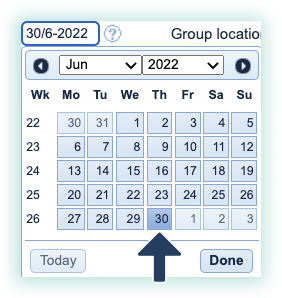
This will result in the 4.29 weeks being converted to five weeks in the chosen month (had the 30th been on a Wednesday, the period would have only consisted of four weeks):

Round to whole week in the billing basis

This setting enables you to invoice based on rounded whole weeks in the billing basis.
To set up this setting, go to: