
Skip to content
English
  • There are no suggestions because the search field is empty.

Recommended CSV export settings for different programs

How do I change the settings for CSV exports?

These settings can be used to customise CSV files. They apply to all exports via the table symbol - except for wage exports.
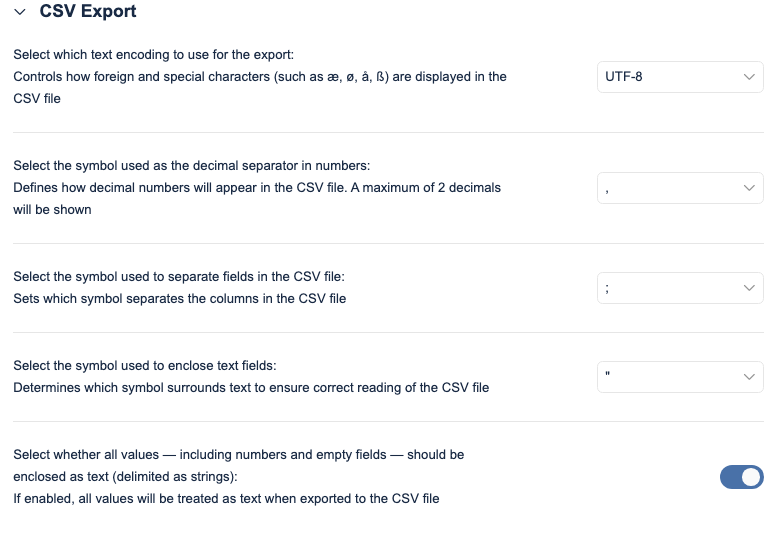
 

Screenshot 2025-04-16 at 10.38.43.png


Which settings should be used for different programmes?

The CSV export settings make it easy to customise your export files to work correctly in different spreadsheet programs.

Below, you will find an overview of which settings to choose for each programme to ensure that your data is imported and displayed correctly.


Recommended settings for different programmes

Program
Recommended Text Encoding 
Decimal Separator 
Field Separator 
String Delimiter 
Enclose as text
Notes
Google Sheets 
UTF-8
, (comma)
; (semicolon)
" (double quote)
Yes

Auto-detects field delimiters (; and ,). Colon : requires manual setup and needs to be changed from automatic separator type to custom separator type. 

Does not support ' (single quote) as string delimiter.

Microsoft Excel 
UTF-8 or Windows-1252
, (comma)
, (comma)
" (double quote)
Yes
Custom field delimiters supported. ASCII and ISO encodings cannot show or special characters.
Excel Online 
Windows-1252
, (comma)
Kun , (comma)
" (double quote)
Yes (with comma decimal)
Only supports comma as field delimiter. Dates may appear as #### until a field is edited.
LibreOffice
UTF-8 (recommended)
Flexible
Flexible
Flexible
Yes
Very flexible. Only fails if incompatible combinations are used (e.g. comma for both decimals and fields without string delimiter).
WPS Office 
UTF-8 (recommended)
Flexible
Flexible
Flexible
Yes
Supports all common settings and customisations for correct import.


NOTE:

The following combination of settings makes it impossible for programmes to read the CSV file:
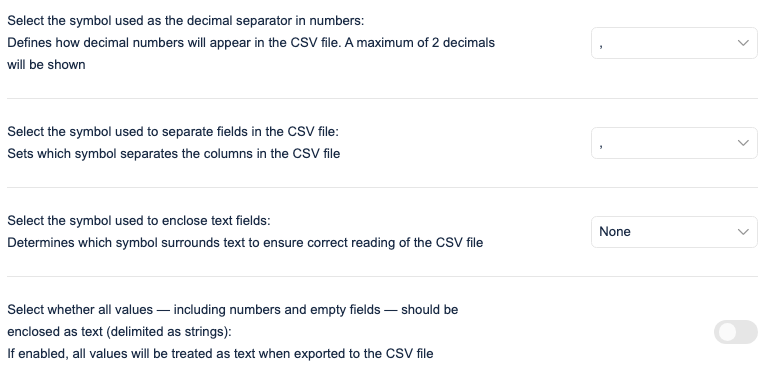
Screenshot 2025-04-16 at 10.39.28.png

However, if the last option is activated, the file will be recognised and read as expected.