Skip to content
English
  • There are no suggestions because the search field is empty.

How to delete the CleanManager app from iPhones / iPads?

How to delete the CleanManager app from iPhones / iPads?

If you experience technical problems with the app, it can often help to reinstall the app.


Read more in this article:


This is how you delete the CleanManager app from your iPhone / iPads

number_1.png

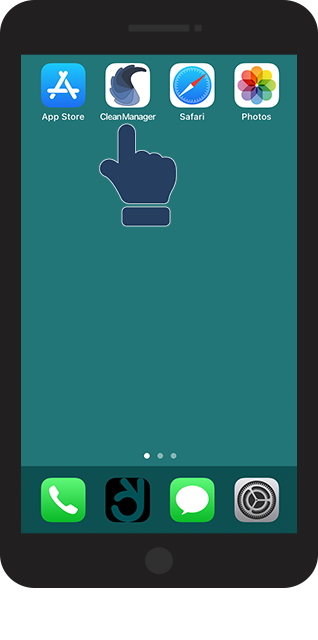
Click on the CleanManager app and hold it until a menu pops up

1.png
number_2.png

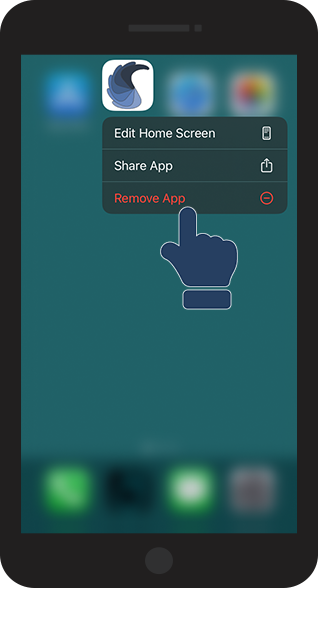
In the menu, click on Remove App

2.png

number_3.png

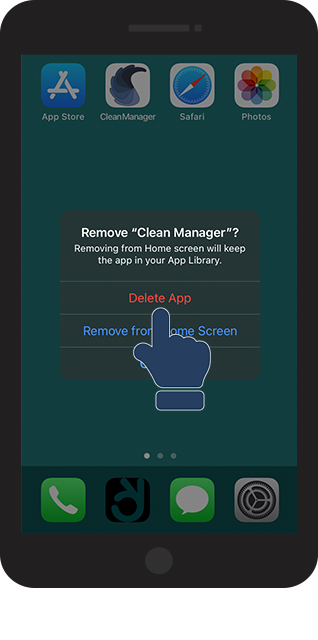
Click in Delete App

3.png

Continue to the article: Installation

Here you can continue to install the app.