Skip to content
English
  • There are no suggestions because the search field is empty.

Deleting a task

How do I delete a task?

It can happen that you have started the wrong task and therefore need to cancel it again.

When you are "deleting" a task, you are not removing the task entirely, and it can be restarted at a later time.
 

Note:
 

Even though you delete the task, attached pictures and comments will be saved in CleanManager.

But all work time spent on the task will be removed.


How to delete a task

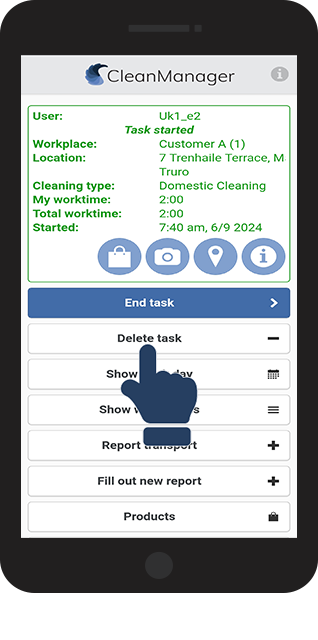
Cancel your current task by selecting Delete task to be able to start a new one

number_1.png
Click on Delete task to cancel your current task
 
1.png
number_2.png
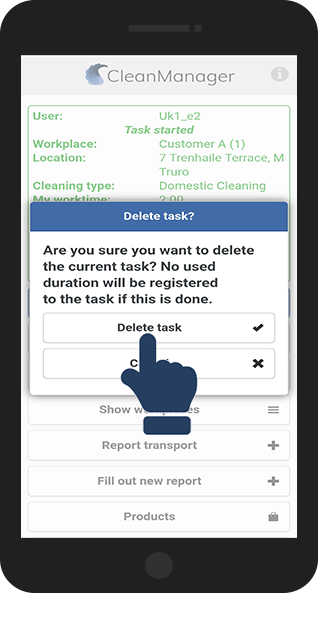
Click on Delete task to confirm that you would like to delete the task and the used duration on the task
2.png
number_3.png
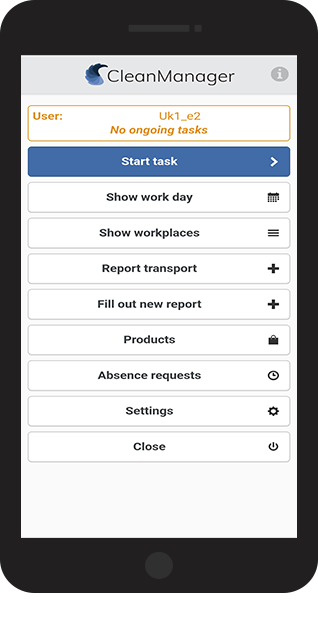
The task has been deleted, you can restart the task or start a new one


A good tool for keeping track of your tasks is the menu section "Show work day"
 

Read more here: View your workday

3.png