
How do I set up alarms for tasks?
Alarms can be set up individually on separate tasks in the calendar.
You can hereby use it to track employee check-ins on assignments for a limited period of time or for a specific Customer / Employee.
It is possible to set up general alarm settings to specify when administrative employees should receive notifications about any failed check-ins / check-outs.
There are 3 different settings to specify when and who is receiving those notifications:
- After how long, when no check-in or check-out time has been registered, should an alert be triggered if set for a task?
- Send out an alarm, if the check-out time is not registered?
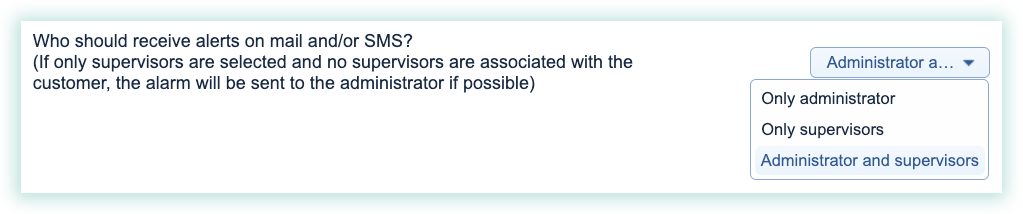
- Who should receive alerts by mail and/or SMS?
After how long, when no check-in or check-out time has been registered, should an alert be triggered if set for a task?
If an alarm is activated on a planned task, then this setting will define how long time will pass before an alarm is released.
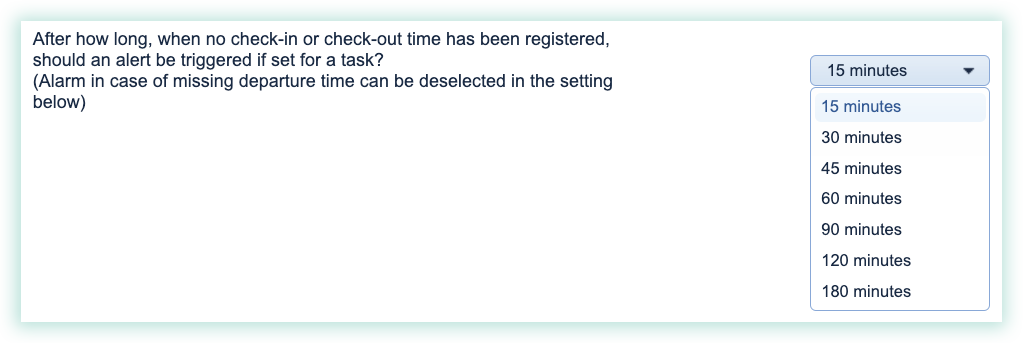
The release of an alarm at the lack of check-in or check-out is defined based on the times that have been specified on the individual tasks.
The calculation of the alarm release is based on the following formula:
(Latest end time) - (Working hours in total) + (Alarm setting)
A task could be created with the following information:
Earliest start time: 10:00
Latest end time: 14:00
Working hours in total: 02:00
The calculation for the release of the alarm would then be:
14:00 - 02:00 + 15 minutes
The alarm would then be released at 12:15
To set up this setting, go to:
Settings > General settings > App and check-in
Send out an alarm, if the check-out time is not registered?
This setting is used to set up whether administrative employees should also receive alarms in case of lack of check-out on tasks:

The release of the alarm is defined based on the check-in time and the times defined on a task.
The calculation for the release of an alarm if there is no check-out is based on:
(Check-in time) + (Working hours in total) + (Alarm setting)
A task could therefore contain the following information:
Check-in time: 12:15
Working hours in total: 02:00
The calculation of the release of the alarm would in this case be:
12:15 + 02:00 + 15 minutes
Which results in the alarm to be released at 14:30
To set up this setting, go to:
Settings > General settings > App and check-in
Who should receive alerts by mail and/or SMS?
This setting enables you to choose which type of employee should receive notifications regarding missing check-ins and check-outs on tasks.
(If an alarm is being sent by E-mail or SMS depends on the settings chosen for the individual task.)
Note:
The supervisor setting depends on how you set up your company structure.
If tasks belong to a customer, which is assigned to a customer area with only 1 supervisor connected to it, then it would only be this one supervisor that receives a notification.
If there are multiple supervisors connected to a location, all would receive a notification.
For more information regarding this, go to Company Structure.
To set up the setting, go to:
Settings > General settings > App with Time Tracking